Discord Pride PFP: Make One That Pops in Any Server
Make a Discord pride PFP that stays crisp at every size — avatar dimensions, dark-theme tips, and a free pride PFP maker with no watermark or signup.
A Discord pride PFP has a harder job than almost any other profile picture on the internet. It gets crushed down to a tiny circle next to every message you send, it has to survive both dark and light themes, and it's often the only visual introduction you get in a server of thousands of people. This guide covers everything Discord-specific: the actual avatar dimensions that matter, why some pride flag designs read beautifully at 40 pixels while others turn to mush, and a step-by-step walkthrough using our free pride PFP maker — no watermark, no account, nothing to install.
If you want a general primer first, our guide on how to make a pride PFP covers the basics for every platform. This one is all Discord.
Discord profile picture size: what actually matters
Discord's official minimum for an avatar is 128×128 pixels, and the upload cap is generous enough that you should never be anywhere near the minimum. Here's the practical breakdown:
- Upload at 1024×1024 or larger. Discord downscales your image to generate every size it needs. Starting big means every downscaled version stays sharp. Starting at exactly 128px means the enlarged version on your profile popout looks soft.
- Discord crops to a circle. Whatever you upload as a square, everyone sees as a circle. Anything in the corners of your image is gone — which is exactly why border-style pride PFPs work so well here (more on that below).
- Most people see you tiny. In chat, your avatar renders at roughly 40px. In the member list, smaller still. The full-size version only appears when someone clicks your profile. Design for the small version first.
Our free LGBTQ PFP maker exports at high resolution by default, so the "upload big" part is handled for you — you just download and drop it into Discord.
Why the ring style wins on Discord
You have three broad options when adding a pride flag to a photo: a ring (border) around the edge, a flag background behind a cutout, or a translucent overlay across the whole image.
At Discord sizes, the ring is the clear winner, and the reason is geometry. Discord's circle crop and a circular flag ring are the same shape. The ring hugs the exact edge of the visible circle, so none of it is wasted, and the flag stripes stay recognizable even at 40px because they sit in a clean, predictable arc. An overlay, by contrast, tints your whole face and can make you harder to recognize at small sizes; a background only works if your subject is clearly cut out from it.
There's a second, sneakier reason: theme contrast. Your avatar floats on Discord's dark gray in dark theme and near-white in light theme. A flag ring acts as a built-in frame that separates your photo from both. Some flags handle this better than others:
- The transgender flag — light blue (#5BCEFA), pink (#F5A9B8), and white (#FFFFFF) — is bright enough to pop on dark theme, and the blue and pink hold their own on light theme even though the white stripe blends in a little.
- The nonbinary flag — yellow (#FCF434), white (#FFFFFF), purple (#9C59D1), and near-black (#2C2C2C) — is a great all-rounder: the yellow carries dark theme and the dark stripe carries light theme.
- The classic six-stripe rainbow (#E40303, #FF8C00, #FFED00, #008026, #24408E, #732982) is high-contrast in both directions, which is part of why it reads instantly at any size.
- Flags with black or very dark stripes, like the asexual flag (#000000, #A3A3A3, #FFFFFF, #800080), partially melt into dark theme — the purple and white stripes do the identifying work there. A slightly thicker ring helps.
If you want a deeper dive into border thickness, stripe order, and which styles suit which flags, we wrote a whole pride flag border guide about it.
Server avatars, roles, and pride server culture
A few Discord-specific things worth knowing before you commit to one avatar everywhere:
Server avatars are a thing. With Nitro, Discord lets you set a different avatar per server. That means you can run your pride PFP in your community servers and keep a plainer one in, say, a work or class server — or the reverse. If you're on the free tier, your one global avatar shows everywhere, so pick the version of yourself you're happy showing in all your servers.
Pride servers love coordination. Many LGBTQ community servers use self-assignable roles that color your username with your flag's colors — pairing a trans-flag ring with a trans-colored role name is a small joy that never gets old. Some servers run avatar themes for Pride Month or big events, and joining in is one of the fastest ways to feel at home in a new community.
Matching avatars are half the fun. Friend groups and couples on Discord often coordinate PFPs — same style, same flag, or two halves of one photo. We built a dedicated matching PFP maker that splits a single image into a coordinated pair, and there are plenty of ideas in our matching PFP ideas roundup if you want inspiration first.
How to make a Discord pride PFP (step by step)
Here's how to make a pride PFP for Discord, start to finish. It takes about two minutes and costs nothing.
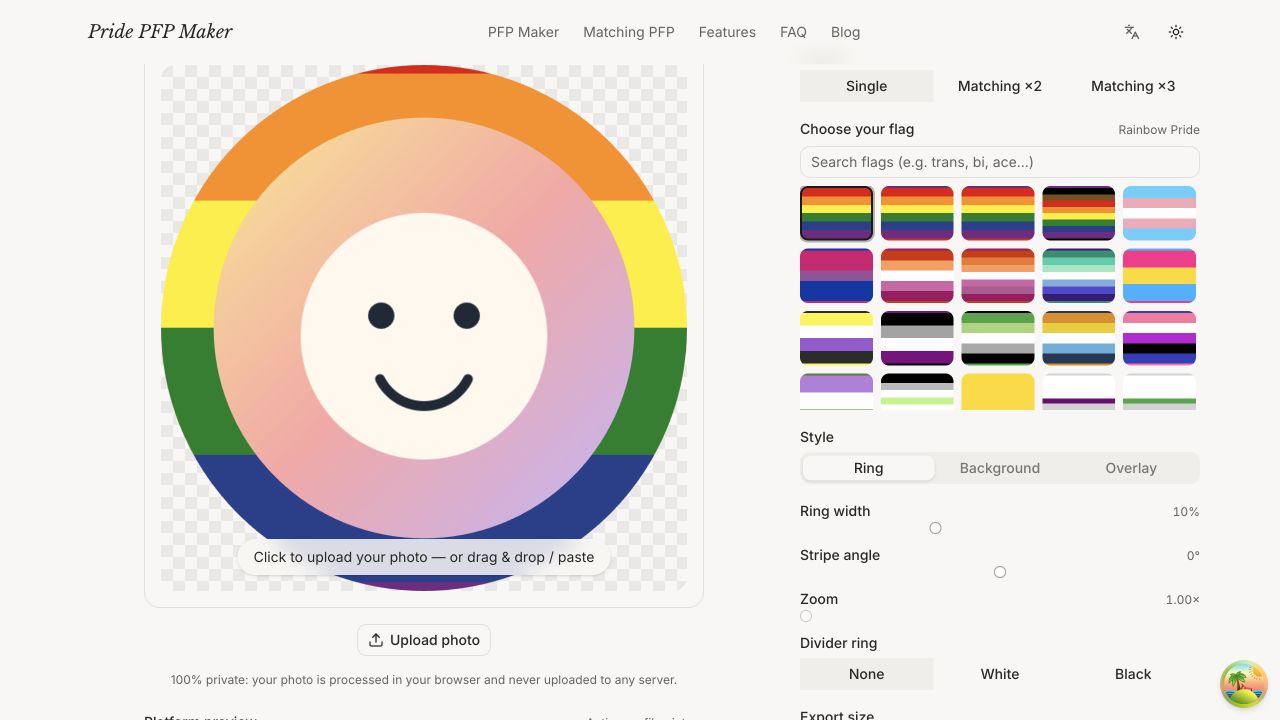
- Open the pride PFP maker in any browser — desktop or phone, no app and no signup. Everything runs locally, so your photo never leaves your device.
- Upload your photo. A well-lit shot where your face (or your fursona, or your cat) fills most of the frame works best, because Discord will shrink it hard.
- Choose your flag. There are 28 to pick from — rainbow, Progress, trans, lesbian, bi, pan, nonbinary, ace, aro, and plenty of less common ones.
- Pick the ring style. For Discord, start with the ring/border option for the reasons above; you can preview background and overlay styles too and see what reads best.
- Adjust. Zoom and reposition your photo inside the circle, and tune the ring thickness. Check the small preview — that's roughly what people see in chat.
- Download the HD PNG. It exports large and watermark-free, with transparent-background support.
- Set it in Discord. Go to User Settings → Profiles → Avatar (on mobile: Settings → Profiles), choose Change Avatar, upload your PNG, and adjust the crop. Done.
What about animated pride avatars?
Animated avatars on Discord require two things: a GIF file and a Nitro subscription (free accounts can only display static images, even if you upload a GIF). A slowly rotating pride ring looks genuinely great in a member list, so it's a fair reason to want one.
Honest status update from us: our tool currently exports static HD PNGs only. Animated GIF export is on our roadmap — it's one of the most-requested features — but we'd rather ship it working well than promise a date. Until then, a crisp static ring still out-reads most animated avatars at chat size.
FAQ
What size should a Discord pride PFP be?
Upload a square image of at least 512×512, ideally 1024×1024. Discord's minimum is 128×128, but larger uploads stay sharper everywhere, especially on your profile popout. Our maker exports well above this by default.
Why does my pride PFP look blurry on Discord?
Almost always one of two things: the source image was small (near 128px) so Discord's scaling softened it, or the photo itself was compressed before you added the flag. Re-export at high resolution from a decent original and re-upload.
Can I use a different pride PFP in each server?
Yes, but per-server avatars are a Nitro feature. Free accounts have one global avatar that appears in every server.
Does the ring style work with any pride flag?
Yes — all 28 flags in our maker render as rings. Flags with strong color contrast between stripes (rainbow, trans, pan, nonbinary) read best at tiny sizes; for mostly-dark flags, just nudge the ring a little thicker.
Your avatar is doing introductions for you in every server you're in — let it say something true. Make yours in about two minutes with our free Discord pride PFP maker, then go set it before you talk yourself out of it. 🏳️🌈
使用 Maker 制作的 PFP 灵感
参考这两个完成效果,开始设计你自己的骄傲头像。